 Guest author Dean Mayer (Anax) talks about tools that he finds most useful as a crossword setter. By the end of this article, you will have an overview of the features these setting tools provide, their differences and some tips to help you decide which one to buy. Anax is a professional cryptic crossword setter for the top daily crosswords in UK - The Independent, the FT as Loroso and anonymously in The Times. He blogs here and tweets as @anaxcrosswords. |
Generally, there is such a thing as good freeware, but when it comes to creating publishable crosswords the only realistic option is to buy a professional package, and for serious setters there are just two big names – Crossword Compiler and Crosswordman. For ease of reference I’ll refer to the former as CC and the latter as TEA (based on its former name of TEA and Sympathy). They both offer an extensive range of features; equally they both have fundamental differences, which is the reason I use both! More of that later.
I’ll try to run through what each of these packages does/doesn’t offer, but from the outset it’s worth mentioning that a new release of TEA is on the way. Although I can’t go into detail, I can say there are significant improvements to what is already an outstanding piece of software, and many of these improvements revolve around the sophisticated wordplay tricks employed by (typically) thematic barred puzzle setters. I know this because, after contacting author Ross Beresford with a small tweak suggestion, he told me a new release was in the pipeline.
So – what does “serious” mean?
OK, if you’ve put together a crossword and want a publication to accept it they will, at the very least, need high resolution grid artworks and typographically faultless clues. In most cases, though, and particularly as regards newspapers, they will already be using either CC or TEA and will expect submissions in one of those formats. Even if newspapers aren’t your target, the ability to export all elements of your work at high quality is of huge benefit. But there’s so much more to it than just artwork. Creating a cryptic crossword (especially) is a labour of love, and full-featured crossword software can actually inspire you to create even better work. Let’s start with CC.
Crossword Compiler
The basic package currently costs €39, but there are a range of add-ons including WordWeb Pro (dictionary and thesaurus), various word lists and a Pro Grid Filler which is most useful for heavily or fully cross-checked puzzles where a manual fill can be extremely difficult. Bought separately these would amount to the princely sum of €188 but you can go all-in for a very reasonable €129 (£109). Is that expensive? I don’t think so. In terms of what it offers the crossword setter it is at least equivalent to what PhotoShop offers the image manipulator for something like £600. Remember, CC is a professional package used by the majority of newspapers – it’s not a toy!
What does it offer? Well, when you launch the software you’ll see this:

You can see immediately how wide a variety of puzzles it’s designed to help you to produce. For me, that alone is worth the entrance fee. What about those “Other templates”? Whenever you create a puzzle you have full control over its appearance – cell size, line colours and weights, block colours, fonts etc. Any of these can be saved as a template, so when you go to create a new puzzle (let’s say ‘Round Tour’ from that list) all of those previously specified parameters will be in place.
Within any grid design you can assign special values to cells. A numbered cell can use a letter instead, or be left blank – useful for some thematic puzzles – or it can appear in a different colour or have a circle in it. You also have the choice of whether or not to have these format options visible in the solution grid.
Most of the puzzle types have a generous selection of pre-designed grids, but you can also make your own. Selecting the ‘Cryptic or quick’ puzzle you are presented with (I’ve scrolled down to highlight a grid):

“Fill in alternative blocks” allows you to launch with a basic lattice of alternate rows and columns of 15-letter lights which you can then split up as you wish – “Design the grid myself” launches a completely blank grid. For now I’ll continue with the selected grid above, which launches as:

In this grid I’ve inserted a few answers and highlighted the next one I want to fill; here is one of CC’s most useful features. In choosing the answer here I must be careful about the M which appears in the second intersecting down answer. If I selected DISAMBIGUATE for the highlighted answer it would be impossible to find anything for -M-B---, but CC can tell me this via its search pane:

Clicking the little grid icon at the bottom of the pane firstly removes any answers that would cause a cross-checking problem, and also highlights the answer which will give the highest number of potential cross-checking answers:

It doesn’t mean SIGN LANGUAGE is what I’ll choose, but at least the unusable DISAMBIGUATE has gone. When it comes to writing clues CC is helpful in providing a good dictionary and thesaurus (for the record, TEA’s version is pretty much identical in content) and the Clue Edit instruction invokes:
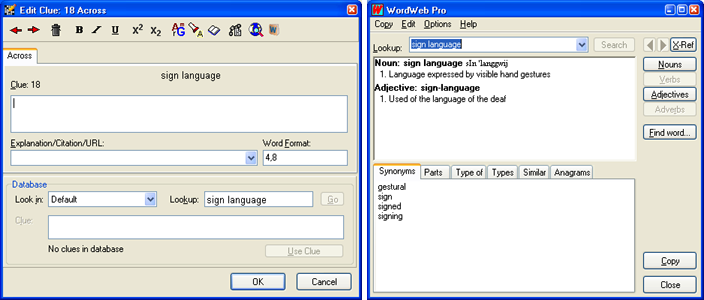
Immediately evident in the second window (accessed via the top right icon of the toolbar) are the various tabs via which you can select e.g. examples of your answer and even anagrams. To the left of the WordWeb Pro icon is a facility which directs you to online dictionaries where your answer is listed. Two other icons are significant; the “chain” icon lets you link answers whose components are separated in the grid, e.g.:

The “book” icon brings up a modest selection of indicators for 1- or 2-letter components. It also lists anagram and some other wordplay indicators which are useful, but it’s at this point TEA comes into its own as it is far superior when it comes to suggesting how answers can be split into wordplay components and how those components can be indicated.
OK, so let’s zoom ahead and see what we can do with a completed puzzle. Above the entry PARTNERS in the sample grid is a button which says “Web Publish”. This brilliant feature starts by offering a huge number of options for how you want your interactive online puzzle to look. The overall applet dimensions, grid cell size, clue panel width, colours, fonts, whether or not to include ‘Reveal’ buttons, timer, even an automatically generated PDF version – all of this and more is at your disposal. Once you’ve made your choices, click “Upload to web” and your puzzle presents itself online, at which point you can add a title, author name, instructions, even a picture if you want one. You can select to make your puzzle public (can be searched by anonymous users) or private (only accessible to those for whom you provide a link) and there you are – an online puzzle for the pleasure of your fans. It’s a doddle.
Well, I say ‘doddle’. It isn’t always a smooth process and if you’ve already got your browser in action before you press “Upload to web” you may get a “Cannot display the web page” message. Just to avoid that frustration, exit your browser first – I do that and never have any problem. Once your puzzle is online, also remember to copy and paste the URL somewhere. You can of course access an admin area to call up the puzzle but making a note of it beforehand is usually more practical.
You can also export your puzzle offline in various formats. For reference I always produce a complete puzzle in a Word doc, with grid, clues, numbered solution and clue explanations; all of these can be copied to the clipboard separately.
You can also export the puzzle as a PDF, or in any of the “display” formats such as AcrossLite, or as simple TXT, or (in the case of grids) a variety of image formats. This grab gives an idea of the options:

It’s pretty comprehensive! The only not-so-good feature is PDF – while everything works, personally I find the resulting layout a bit clumsy and it’s not very easy to adapt it (there aren’t many formatting options anyway). If you want to generate PDFs I recommend clipboarding everything into Word and using a free PDF generator such as NitroPDF, which produces the file via the print dialogue.
Despite the imperfect PDFs and the limited wordplay facilities it’s hard to give this package anything other than 10 out of 10. In daily use it’s deliciously simple to use and you’re very unlikely to think to yourself “There’s something missing here”. And as for the price… well, I mentioned PhotoShop. I’m also very much into music recording and as soon as you get into professional software as used by professionals the costs become astronomical. CC is professional, and €129 for all of these goodies is exceptional value.
Crosswordman
In terms of puzzle types TEA isn’t a patch on CC, but it isn’t supposed to be. Its creator Ross Beresford has a Listener crossword background and the highly sophisticated nature of this puzzle genre echoes all the way through TEA. The software consists of three main (separately purchasable) products – Sympathy Crossword Construction, TEA Crossword Helper and Wordplay Wizard – I can’t emphasise enough that buying all three is what you really need to get the full enjoyment. If you already have CC it could be argued you don’t really need TEA Crossword Helper, but since the entire package costs £129.95 it’s worth the £25 of that for TEA, if only for the convenience of not having to switch between applications!
INCIDENTALLY – for both CC and TEA, after ordering online you receive a download link for the software; you don’t need to sit around waiting for a CD-ROM to arrive (although that is an option).
When you launch TEA this is what you get:

There are fewer toys to play with than CC but, as you can see, everything revolves around puzzles for which you will be writing clues. Preset grids are available and, of course, you can design your own – and you also get the standard sets of Times and FT grids. Note that both of these are incomplete; the Times recently launched a handful of new grids and new ones have been appearing in the FT too; these will be incorporated in the new release of TEA.
Once you have selected a grid you can also choose which of the inbuilt word lists to use, and TEA’s implementation of this is, I think, better than CC in that all of the word lists appear together rather than under separate tabs:

There is also the ability to check the dictionary entry for an answer by highlighting it in the list and keying Ctrl + Enter, which is helpful in deciding if the definitions point towards a good clue in conjunction with whatever wordplay elements you uncover. The “Sport” word list is one I created, so TEA’s dictionary won’t feed off its entries. The same applies to entries which have an italicised dictionary citation – you’ll need to refer to the appropriate dictionary for a definition (but most of us have at least one dictionary, don’t we, if we’re ‘serious’ crossword setters?).
Like CC you can chicken out and let the software fill the grid, but TEA recognises that giving the setter no choice in this process may be a bad thing, so you can opt for an interactive fill. This is especially clever:

TEA examines the grid and calculates which light should be looked at first to (hopefully) ensure maximum fillability. It then “scores” each potential answer to show which will offer the greatest number of options as you continue the fill.
Filling the grid is fun enough, but TEA’s first major difference versus CC is the way you can search its wordlists. Built into its engine are various parameters which you can use to look for anagrams, part anagrams, specific letter patterns and much more. I like to produce the occasional pangrammatic crossword, and when I have just a couple of slots left it’s great to be able to insert a string such as:

TEA instantly offers SILVER FOX and SULFOXIDE as entries which match my requirement for a 9-letter word starting S-something-L and containing the letters F and X somewhere. And supposing I want to make a themed crossword where several anagrammed answers contain the name of a tree? Easy – I choose a tree, plant it in the search string and away we go:

There are a great many search templates to use, employing choice lists, variables and macros, and sometimes it’s a fascinating exercise just to play around with those. An example from the help file illustrates a search input as L[^AEIOU]... - in other words it will look for 5-letter answers starting with L but with a consonant as the second letter. Digits can be used to “lock” particular letters, so .11...11.. will produce a list of answers where the second, third, seventh and eighth letters are the same, as in FOOTSTOOLS, whereas .11...22.. will read as the same pattern but with a different double letter towards the end of the word, as in BOOKSELLER. Because most of the patterns can be used in combination you end up with an almost endless array of search possibilities.
The tricks are not confined to patterns for individual lights. Gimmicks can be added to puzzle fill, such as letters latent or misprints using this dialogue:

Once again, it’s worth mentioning that further gimmicks will be available when the new version of TEA is released.
As for the grid fill, I’d say there is only one area where I think CC has the upper hand, and that’s the process of linking lights to form single answers. It can be done in TEA, of course, but the CC version is far more straightforward. However, I believe that in the new release it will be possible to highlight separate lights in the grid, in any order, search for answers fitting the resulting pattern and automatically link them, so it could turn out that TEA will win that contest.
When an answer has been placed in the grid, there is no need to click an icon to begin writing its clue. A correctly placed double click on the answer itself will invoke the clue-writing pane:

As the tabs indicate, TEA offers plenty of scope for ‘unusual’ extras for an answer or its corresponding light, but below the ‘Clue’ window is a button of particular importance. The Clue Workshop (sold separately as Wordplay Wizard) is an aspect of TEA that isn’t just good – it can, and probably will, help you to become a better cryptic clue writer. I’ve been setting cryptics for more than thirty years, but Clue Workshop has a habit of showing me ideas which I may have missed had I been working without it.

Arranged in order of the number of wordplay components, the Workshop offers an often bewildering array of breakdowns which recognise deletions, charades, anagrams, reversals, containers, alternate letters and more. You’ll notice that each offering features items in red and blue text. A right click of blue items reveals a list of abbreviations pertinent to that letter or pair of letters. This list also indicates how commonly known those abbreviations are, so you can select one according to your target audience or according to what is sanctioned by your crossword editor. A right click of the red items leads to wordplay indicators for anagrams, charades, containers, reversals etc.
Although I haven’t gone into a huge amount of detail about this aspect of TEA, it is in my opinion an aspect of the software which is massively important for setters of all standards. Although, to be honest, I wouldn’t recommend it (because the rest of the package is so good) Clue Workshop is available as a separate module which you can use outside of TEA.
Puzzle export from TEA is perhaps not as extensive as CC but what it offers is generous enough to cover everything you are likely to need:

Since one of the export options is Across TEXT it is easy to create the full puzzle format ready for use in AcrossLite.
CC and TEA both display your work in progress, but do it differently. In CC you open a separate window to see the clues written so far, while TEA presents a full page with title, grid, preamble and clues on view. Neither is superior to the other, but it’s something to bear in mind if one option is preferable to the other.
Which one to buy?
To be absolutely honest, if your budget can stretch that far you really should go for both, as both packages are packed with useful features, a small number of which are unique but well worth having. However, buying both will set you back about £250 (on average I suppose that equates to about two published UK newspaper crosswords), so what if it really comes down to one or the other?
If you want to concentrate on sophisticated, inspired cryptic crosswords TEA looks to be the only option. The only (fairly small) downside to this is that newspapers tend to prefer submissions in CC – I set for the Times, FT and Independent and all of these request crosswords as CC files. I’d say the Independent is the most insistent because the online puzzle uses CC’s Java applet; the Times and FT do their own thing.
For me, I have to say I couldn’t manage with just one of the two. Overall, CC edges it in terms of simplicity and ease of use, while TEA has those features which make the clue-writing process hugely enjoyable and inspiring. I actually had an ancient demo version of TEA for several years, but later chose the full download of CC because at the time I was producing sudoku puzzles for my own website. Just over a year ago, after seeing that TEA had developed significantly compared to my old demo, I downloaded that too.
Before I toddle off for a coffee and resumption of my latest brain-killer, I should mention that CC and TEA aren’t the only packages out there. Crossword Maestro and Crossword Weaver are two others which spring to mind, but I’ve never used them so can pass no comment – perhaps others would like to chip in?
Links:
Crossword Compiler: http://www.crossword-compiler.com/
Crosswordman: http://www.crosswordman.com/
Related Posts:
If you wish to keep track of further articles on Crossword Unclued, you can subscribe to it in a reader via RSS Feed. You can also subscribe by email and have articles delivered to your inbox, or follow me on twitter to get notified of new links.


 Older Posts





 Follow on Twitter
 Join us on Facebook
 Get RSS
