Showing posts with label tools. Show all posts
Wednesday, 24 April 2019

Crossword Software To Make Puzzles With Multiple Letters Per Cell

In the article Crossword Grids That Hold More Than One Letter Per Cell, cryptic setter eXternal (Steve Bartlett) gave us a detailed tour of “rebus” crosswords, with tips for setting and solving such puzzles. In this article, he walks us through software that can be used to create crosswords with the many-letters-per-square gimmick.

Steve is the editor of Enigmatic Variations crossword in The Telegraph. He also sets advanced puzzles in the series of The Listener and Inquisitor, and standard cryptic puzzles for The Daily Telegraph (as proXimal), The Independent (as eXternal), Financial Times (as ARTEXLEN), The Herald (as Boz) and The National (as Claymore).

Handing over the reins to Steve for this article…thank you!

- Shuchi

It is quite simple to create a puzzle with more than one character per cell by using crossword-creating software. I will describe how to do this using Qxw, which can be downloaded for free from Quinapalus. I use this tool for all my barred puzzles and thoroughly recommend it, as it enables the setter to produce complex puzzles relatively easily.

I'll demonstrate how to use Qxw to produce puzzles with multiple letters per cell with reference to a couple of puzzles I created: one called Odd One Out in collaboration with Serpent for The Inquisitor series in The i; and one called Disappearances, which appeared in the Enigmatic Variations series in The Sunday Telegraph in 2017.

Odd One Out by eXtent

Serpent and I decided to theme a barred puzzle on Brexit. We wanted a grid which would include IVR codes of members of the EU in single cells. The number of letters in IVR codes for these members ranges between 1 and 3 — for example, Portugal is P, Czech Republic is CZ and Ireland is IRL.

Below is an outline of the grid we prepared:

Odd One Out by eXtent - The Inquisitor - Grid Outline

In order to get the three letters IRL in one cell, we needed to do the following:

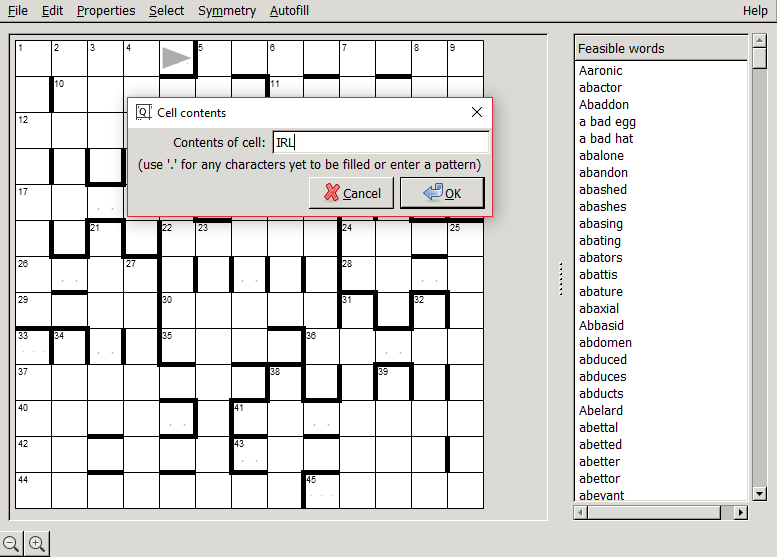
Click on Edit — Cell contents. Then just enter IRL in the dialog box.

Qxw - Edit - Cell Contents

Qxw - Edit - Cell Contents - IRL

Qxw then suggests a number of feasible entries (show in the panel on the right) for insertion.

We simply repeated this procedure for other cells around the grid for each of the two- and three-letter IVR codes. The final grid appeared as follows:

Odd One Out by eXtent - Filled Grid

A blog of the puzzle by HolyGhost at Fifteensquared can be found using this link: Inquisitor 1588: Odd One Out by eXtent.

Disappearances by proXimal

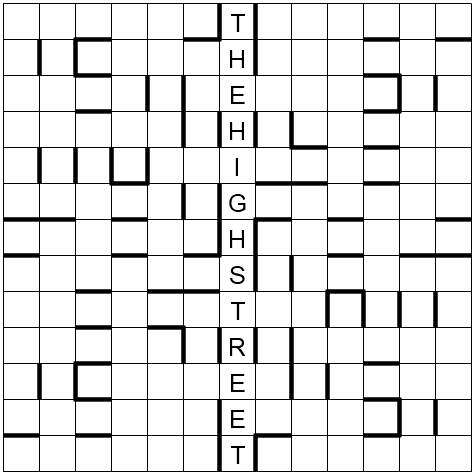
I had decided to base a puzzle on a theme of the decline or disappearance of stores from High Streets. The phrase THE HIGH STREET lends itself really well to being used in a barred crossword, as it has 13 letters and such grids are often 12x12 or 13x13. I decided to have THE HIGH STREET as a thematic unclued entry running down the central column of a 13x13, with names of shops which have disappeared produced by clashes on both sides of THE HIGH STREET. The clashes could be nicely thematically represented just by leaving the clashing cell blank, thus the stores are disappearing.

So, I started with a grid as follows:

Disappearances by proXimal - THE HIGH STREET

I decided to have five shops either side of THE HIGH STREET to produce a nice range and an interesting challenge for the solver. Firstly, I searched for shops which would lend themselves easily to being divided, to be produced from clashing words using Across and Down entries, but also ones that were relatively well-known. One of the most famous which I decided to use is WOOLWORTHS, which could be split as WOOL and WORTHS.

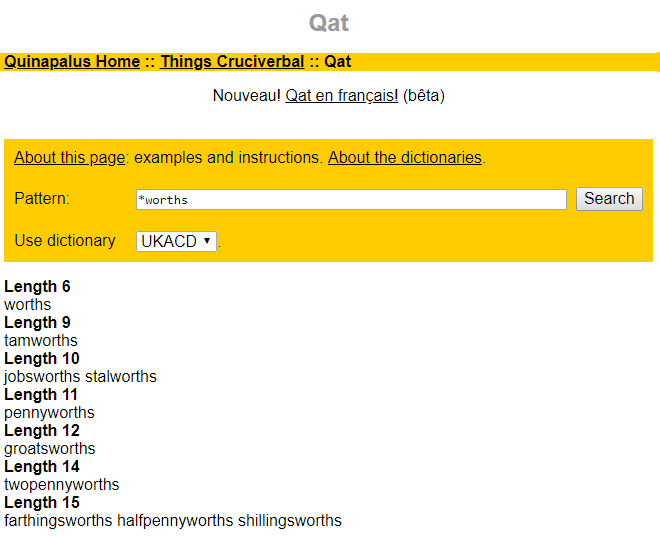
There is a useful pattern-matching tool on the internet called Qat, designed by Quinapalus, who also developed Qxw; I used Qat to check which words could end in WORTHS and which could start with WOOL. The picture below shows the search for words ending in WORTHS (using search term *worths):

Qat - Word Pattern Search

I liked the look of JOBSWORTHS and decided to have this entry in the grid to provide a clash in the last cell of a five-cell entry; the number of words starting with WOOL, to provide the Across clash, was much higher.

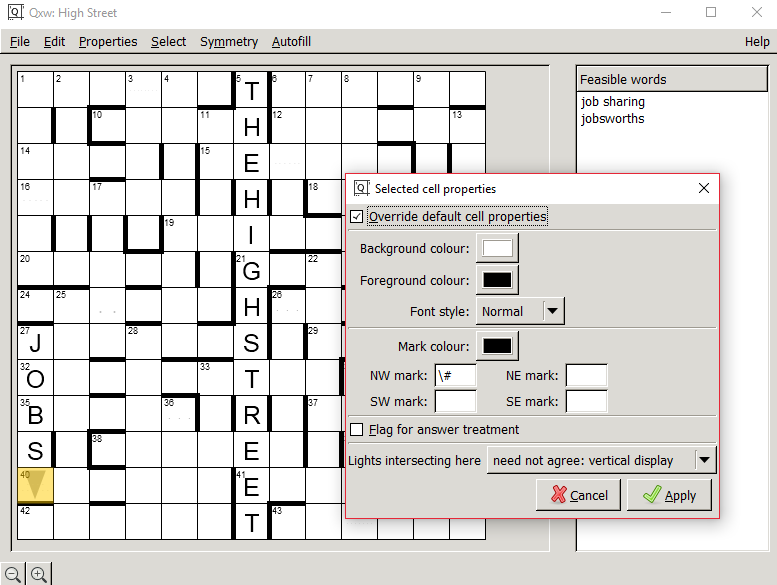
Back to Qxw, I put JOBS in the entry at 27 Down with the last cell blank to accommodate WORTHS in one cell. To enable Qxw to work with clashing entries, one does the following:

1. Select the cell which you want to use (shown in yellow below), by clicking Select and then Current cell, when the cursor is in the cell.

2. Click on Properties — Selected cell properties. Then tick the box which says Override default cell properties and further down, change 'Lights intersecting here' to 'need not agree'.

Disappearances by proXimal - Qxw - Intersecting Cells Need Not Agree

This now meant that I could specify an entry beginning with WOOL at 40 Across, with the four letters of WOOL being accommodated in the first cell, to clash with WORTHS provided by the down entry. In order to do this, the following is required:

Click on Edit — Cell contents. Because I have previously specified that the cell can accommodate clashes, a box appears which allows us to enter multiple letters for the Across and Down entries meeting in this cell.

Disappearances by proXimal - Cell Contents

Hence, once I had specified that the contents of the cell for the Across entry should be WOOL, Qxw provides me with a number of feasible entries: WOOLDINGS, WOOLFELLS, WOOLIEST, WOOLPACKS, WOOLSHEDS, WOOLWORTH.

I then repeated the same process in various cells around the grid to accommodate the nine other shops. The completed grid appeared as follows:

Disappearances by proXimal - Filled Grid

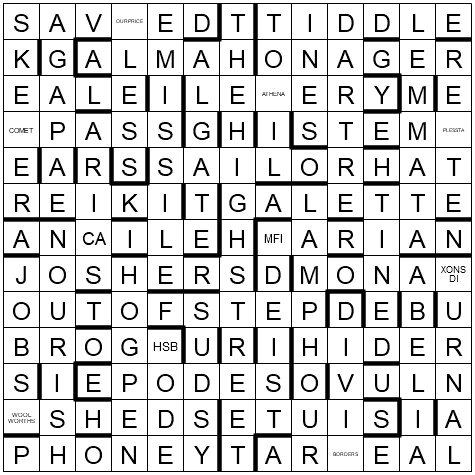
So, for example, SKEETER at 1 Down clashes with COMPASS at 16 Across to create COMET. In this puzzle I also wanted to have real words left when the clashing cells were deleted, so the deletion of the COMET clash would leave words SKEER and PASS in the final grid.

A blog of the puzzle by Dave Hennings at Fifteensquared can be found using this link: Enigmatic Variations No. 1296: Disappearances by proXimal.

Related Posts:

If you wish to keep track of further articles on Crossword Unclued, you can subscribe to it in a reader via RSS Feed. You can also subscribe by email and have articles delivered to your inbox, or follow me on twitter to get notified of new links.

Monday, 16 June 2014

Web App to Solve The Hindu Crossword Online

If the lack of an online solving platform for The Hindu Crossword has been your lament, it is now time to rejoice.

Venkatraman Narayanan, a PhD student in Robotics at CMU and a Hindu crossword enthusiast, has developed an application that lets you solve the daily Hindu Crossword interactively. The application is available at the-hindu-crossword.appspot.com. The site requires no registration/login, is clutter-free and intuitive to use. The home page takes you to the latest puzzle; arrow buttons on the page can be used to navigate to past puzzles.

the-hindu-crossword-online-540

For those interested in the technical nitty-gritties of how the app works: the backend is in Python, which downloads and parses the crossword grid and clues from The Hindu website. This is done using image processing on the grid, and regular expressions for parsing the clues from the HTML source code. The front-end is built upon Jesse Weisback's open-source crossword UI, with a few new features and design changes. Finally, the entire thing is wrapped into a Google app which is automatically updated everyday when a new crossword becomes available at The Hindu website.

The complete app took Venkatraman Narayanan about 10 days to create from scratch. "It initially started off as a hack to help few of my friends and me to solve the crossword online, but I then realized I could polish it and make it useful for THC enthusiasts around the globe", he says.

The app is currently in beta stage, with features like "Save Grid", which saves the solved crossword to disk, in progress. At the time of writing this, the app works for crosswords 1st July 2011 onwards. Development is on to make older crosswords accessible too. Try the app and if you have feedback/suggestions, write to the author venkatraman@cmu.edu.

Related Posts:

If you wish to keep track of further articles on Crossword Unclued, you can subscribe to it in a reader via RSS Feed. You can also subscribe by email and have articles delivered to your inbox, or follow me on twitter to get notified of new links.

Thursday, 8 November 2012

Puzzazz: Puzzle e-bookstore for iPhone, iPad

Puzzazz If you use an iPad, iPhone or iPod Touch, try out this app called Puzzazz, a collection of puzzle e-books that allow you to solve puzzles directly on the pages of the e-books.

The Puzzazz app has been developed by a Seattle-based puzzle technology startup, founded by crossword setter and software architect Roy Leban.

For cryptic crossword solvers, Puzzazz has four e-books in the bookstore at present including one by Brian Greer, popularly known as Brendan in The Guardian. His e-book Across and Down the Guardian Path with Brendan contains 20 handpicked puzzles originally published in The Guardian, including one that was discussed in 2009 on Crossword Unclued: Sample a Themed Guardian Crossword. The other three cryptic crossword books are by Mike Selinker, Todd Rew and Wayne Robert Williams, setters of repute on the American cryptic circuit - visit the author profiles page for details.

"TouchWrite" for handwriting recognition

The app lets you enter crossword answers in an interactive grid using either the keyboard, or a unique feature developed by the Puzzazz team called "TouchWrite" - a way to hand-write answers on the screen with your finger. TouchWrite recognizes a variety of different writing styles: for example, you can draw an E in one stroke like a backwards 3, or in four strokes. The technology seems pretty intuitive and it doesn't require much practice to get it to work accurately. If you do need help, the app provides a TouchWrite guidelines section.

The ability to write directly on the puzzle is very useful on smaller devices like an iPhone because the keyboard takes up a lot of screen space. Check out the video at the end of the post to see TouchWrite in action.

How much does it cost?

The price per e-book ranges from $0.99 to $4.99. The app itself is free, and every e-book in the store is "try before you buy" - at least the first puzzle in every e-book is fully solvable without cost. To view the free puzzle, tap on its number/title. If you view the other non-free puzzles, they will be greyed out and the option to buy will be shown above the puzzle.

Screenshots from Brian Greer's e-book:

Puzzazz-BrianGreerPuzzle

At this time, the Puzzazz store contains 29 puzzle e-books by 17 constructors. Puzzles available so far include crosswords (cryptic and quick) and other word/logic puzzles such as rebuses.

Demo: Watch Puzzazz in action

Here's a 1:38 min video of Puzzazz (version 2.0) in action. The video shows an overview of the e-bookstore, the cryptic crossword page with a sample crossword by Mike Selinker, and the use of keyboard + TouchWrite to enter answers. I guess it is obvious from the demo that I am not accustomed to a touchscreen! Thanks to my friend Paul Schloss for lending his iPhone to try out Puzzazz. [RSS/email subscribers: In case you can't see the video embedded below, please visit the blog.]

Have a look at this Geekwire video as well, which includes a voiceover by Puzzazz founder Roy Leban.

You can get the Puzzazz app here. If you're a crossword setter interested in publishing on Puzzazz, you might want to visit Puzzazz - Call for Constructors.

Related Posts:

If you wish to keep track of further articles on Crossword Unclued, you can subscribe to it in a reader via RSS Feed. You can also subscribe by email and have articles delivered to your inbox, or follow me on twitter to get notified of new links.

Friday, 8 June 2012

Book Review: Cranium-Cracking Cryptic Crosswords

Cranium-Cracking Cryptic Crosswords Tony Chesterley Having seen the work of Tony Chesterley before and his articles on how to write creative anagram clues, I was keen to get hold of his debut book - Cranium-Cracking Cryptic Crosswords, a collection of 40 cryptic crosswords set by him. I've spent the last few weeks solving a puzzle a day from the book and have enjoyed it very much.

It took me a couple of puzzles to get used to the setting style, gradually discovering that the California-based setter is liberal with his anagrams, loves the false capitalization trick and does not do cryptic definitions. [Apparently US cryptic crosswords stay away from cryptic definitions and other complexities like reverse wordplay.] The puzzles are about the Financial Times level of difficulty – a few starter clues, other clues of varied toughness, mostly accessible vocabulary. I occasionally stumbled over unfamiliar American expressions in the answers, which was a change from stumbling over unfamiliar British expressions. Such instances did not lessen the enjoyment of the puzzles, rather made me think "how could I not have known this?" This includes the word 'MacGyveresque' from the introduction.

Each puzzle has a whimsical title, drawn from the surface context of the puzzle's clues. It added to the fun to be battling Pill Bill or reining in Upward Nobility rather than solving Puzzle nos. 4 or 7. There is a distinct American flavour to the clue surfaces, so Yanks and Donners and states of America show up visibly in place of Tories and Cockneys and towns in Britain. The surfaces are thoughtfully constructed, smooth without compromising on the cryptic reading. Sample this:

Puzzle #14, 2A: Adolescent minor released from year-long sentence (8) _O_____L

The book opens with a four-page introduction to cryptic crosswords, allocating a few lines and an example each for the basic clue types. This section manages the difficult art of being compact and clear at the same time. For someone looking for a way to learn cryptic crosswords, the introduction is a nice starting point but I doubt that a new solver would be able to graduate to solving the following 40 puzzles straightaway. What might have helped is a few clues/puzzles with hints to pave the way to the actual puzzles. The good part is that all solutions are annotated, so a new solver who takes a peek at the back pages will learn not just what the answer is but also how it is derived.

Five puzzles from the book are available online. Have a look to get a feel of the book's contents.

About the author & the making of the book

tony chesterley Tony Chesterley started dabbling in setting crosswords about 15 years ago. The first puzzles he wrote were by hand and (he suspects) probably broke all bounds of solvability. He put the idea of serious cryptic setting on the shelf for years till getting laid off in 2008 gave him the time to write crosswords in earnest. He submitted his first puzzle to Alberich, who helped him polish it up and published on it his website. The book has an acknowledgment to Alberich and long-time U.S. setter Bob Stigger.

Tony started filling out his collection last autumn, writing and refining his puzzles over the course of the next few months, finally publishing his book in April 2012.

Almost all the cryptics I've solved are from books, since so few U.S. newspapers carry cryptics these days,” Tony says. “The pool of American cryptics has gotten more and more sparse over the past ten years, and one of my motivations in writing this book was to help fill the void.”

The crosswords in this book have been created with pretty basic setting tools. Tony started with and still uses the freeware version of Puzzlers' Cave Crossword Compiler (unrelated to the professional-level software of the same name). He added Crossword Express to his toolbox when it became freeware, then its successor Magnum Opus which eventually went defunct.

Tony plans to buy Sympathy when he starts work on Cranium-Cracking Cryptic Crosswords Volume 2.

Solve These

In closing, I'll leave you with three more clues from C4 – enjoy.

Puzzle #10, 25A: Lady attending musical Summer, the last for Barry White (10) C___D_____
Puzzle #3, 25A: Twilight is returning to the screen (5) ____E
Puzzle #36, 16A: Swell! Mother takes hours getting prepared (8) __S___O_

Related Posts:

If you wish to keep track of further articles on Crossword Unclued, you can subscribe to it in a reader via RSS Feed. You can also subscribe by email and have articles delivered to your inbox, or follow me on twitter to get notified of new links.

Thursday, 8 March 2012

Dr. Fill, Crossword Solving Software to Compete with Human Solvers

dr-fill-crossword-solver Dr. Fill, a new software than can solve American-style crosswords, is poised to make a keenly-watched debut in the upcoming American Crossword Puzzle Tournament. Dr. Fill has been built by Matt Ginsberg, a former artificial intelligence researcher and now a regular crossword constructor for the New York Times. Matt Ginsberg is also the creator of GIB, the first bridge software to beat several top-ranked human bridge players in 1998.

The crossword solving program has been put through simulations of several past tournament crosswords and has shown consistently high scores. Based on the performance tests conducted so far, Dr. Fill's might place 20th in this year's tournament, The Economist reports.

Dr. Fill will be a "non-ranked participant" in the American Crossword Puzzle Tournament - that is, it won't be competing officially but will solve the puzzles alongside human participants and will submit the solutions to the judges for scoring. According to the banner on the tournament's official site, an "I Beat Dr. Fill" button will be awarded to any contestant who scores higher than Dr. Fill.

What is the secret of Dr. Fill's solving ability?

The abstract for Ginsberg's research paper on JAIR provides this daunting explanation:

Dr.Fill works by converting crosswords to weighted CSPs, and then using a variety of novel techniques to find a solution. These techniques include generally applicable heuristics for variable and value selection, a variant of limited discrepancy search, and postprocessing and partitioning ideas. Branch and bound is not used, as it was incompatible with postprocessing.

Gizmodo makes Dr.Fill's approach sound far more accessible. It is the same one Indians know as ratta.

What makes Dr. Fill so smart, so worthy of competition with those speedy word nerds? Memory. He's basically memorized the entire cannon of crossword puzzles to plug-and-play as needed. Unlike Watson, Dr. Fill wasn't programmed to understand the language of the clues, but rather to play the game.

Dr. Fill's database contains clues and answers for all major American crosswords created since 1900, plus references to online sources like Wikipedia and the movie site IMDb. The program does not try to make sense of the words and clues, instead it sifts through a long list of potential answers for a slot in the grid and fills in the most likely one, then works through the crossing clues.

Will Shortz, crossword editor of the New York Times, sounds skeptical about Dr. Fills ability to beat human crossword solvers but doesn't rule out the possibility [San Francisco Chronicle]:

Because of the complexity of the English language, the breadth of subjects covered in puzzles and the playfulness of crossword themes, I've always thought that a human brain would be better than a computer at solving crosswords. Maybe I'll be proved wrong.

We’ll know soon. The American Crossword Puzzle Tournament begins on 16th March 2012.

Update: Check out this video report about Dr.Fill with shots of the software in action (there's a 30 second ad before the 2:22 min video):

Related Posts:

If you wish to keep track of further articles on Crossword Unclued, you can subscribe to it in a reader via RSS Feed. You can also subscribe by email and have articles delivered to your inbox, or follow me on twitter to get notified of new links.

Tuesday, 7 February 2012

Can a computer program write cryptic clues?

I bet your answer is a vehement "No" (unless you are Spiffytrix's friend). Grid fills maybe, anagram suggestions - but entire clues? Not possible. This isn't Sudoku to get generated by software.

That's what I thought, which is why Enigma took me by surprise. Enigma, the brainchild of David Hardcastle, is a computer program that auto-generates cryptic clues for any word input. David built this program over a period of four years, as part of his thesis for PhD in Computer Science, Birkbeck, University of London.

In his thesis [p245], David says:

there is a widely held (and probably well-founded) belief that computers can generate English language but not “natural” English language. A key goal for ENIGMA is to challenge that belief, and for the system to generate clues with fluent surface texts.

How Enigma Works

Given a word, the first step is to figure out all the ways the word can be clued using the puzzle rubrics configured in the system. The user can then select a particular type from the list and generate clues using that type.

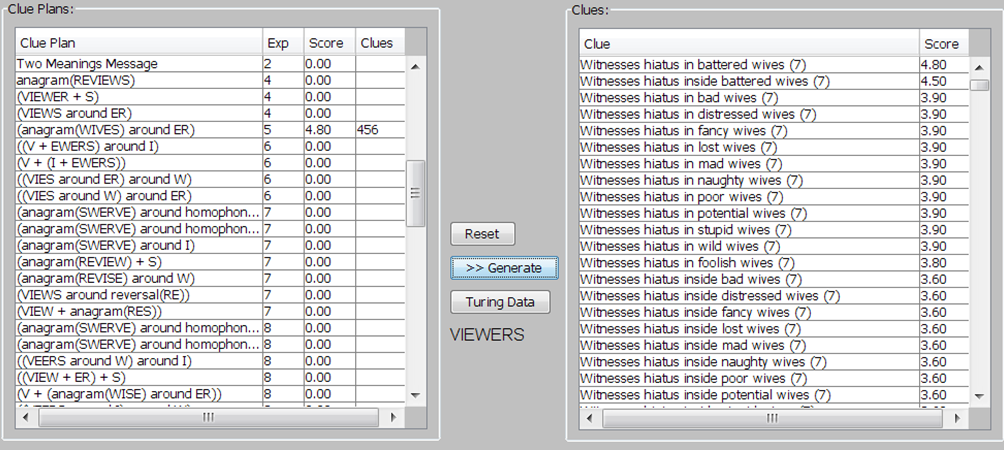
Let's see this work for the input word VIEWERS. The system comes up with a number of "clue plans".

enigma-generate-rubrics

"Exp" represents the number of possible combinations through which the clue could be expressed, where 4 means 104 =10,000 etc.

We select the fifth clue plan - (anagram(WIVES) around ER) - and click the Generate button, then the system generates clues which are shown ordered by rank.

enigma-clue-plans 
[click to enlarge]

Enigma generates the clues by treating the clue plan as a set of chunks and generating text for one chunk at a time. For example, (WIVES)* translates to chunks of text like 'strange wives', 'wives about', 'reorder wives' etc. The system discards those chunks that don't work syntactically (e.g. 'wives problem') or don't work semantically (e.g. 'jumbled wives').

The (rather unfortunate) phrase 'battered wives' scores above other similar alternatives such as 'fancy wives' since it is matched as a "collocate" i.e. a phrase in English with these exact words. The system recognises thematic associations between words by computing word distance between pairs of words in a 100 million word corpus (the British National Corpus) and using a statistical algorithm to determine whether or not a given pair of words is unusually correlated in the text.

Next the system finds ways of representing ER, such as hospital department, pause, etc.

Then the system explores all frames representing 'A in B' with all the combinations of the 'anagram of WIVES' chunk and the 'ER' chunk to try to build a new, meaningful chunk for that whole piece of the clue.

The auto-generated explanation for this clue is:

enigma-clue-explanation  

How Good Are Enigma-Generated Clues?

When Enigma was built, David conducted an evaluation in two ways –

1. Turing-style test – For the same light, two clues were provided – an Enigma-generated clue and a Sun newspaper clue. 30 pairs of such clues were presented and solvers were asked to pick the Enigma-generated clue from each pair.

2. Domain expert assessment - Crossword compilers Jonathan Crowther and Don Manley, editors Kate Fassett and Mike Hutchison, and expert solvers provided their feedback on clue quality.

60 people participated in the Turing-style test and on average they correctly guessed the clue from the Sun newspaper 70% of the time. The best score (parity with the newspaper) was 50% and the worst (obvious to tell apart) 100%. The pairs (now marked with which is Enigma-generated) are here.

The domain experts were harsher critics of the system and found most clues lacking in human wit. The surface reading was right some of the time but not all the time. Another criticism was based on originality. For example, ENIGMA scored the clue "Drain fresh ewers (5)" for SEWERS high, however this has been used often in cryptic clues and a human setter familiar with crosswords would avoid it. While this similarity with human output is something of a success, ENIGMA's inability to recognise originality which comes to human setters is a failing.

The major drawback of Enigma is its dependency on the encoded semantics, which in its current state is rather shallow. For example, in the VIEWERS clue, a human compiler would have spotted 'without hesitation' as a construct for '… around ER', and using same elements have made "Witnesses battered wives without hesitation (7)", a much more fluent clue. This Enigma has not managed – because 'B without A' has not been encoded.

The problem gets compounded when the clue length increases, with the surface becoming nonsensical. The system has no strategic planning component to organise the surface beyond clause and sub-clause level.

Read the detailed evaluation here [p228-262].

The domain experts were asked if any of the clues of a set of 42 were of publishable quality. Mike Hutchinson highlighted 10 clues, Jonathan Crowther highlighted 8 and Sandy Balfour 9. One can conclude that, while Enigma is no threat to human crossword setters, it does get it right at least some of the time.

A Puzzle to Try

Have a go at this crossword with clues generated entirely by Enigma:

Enigma Crossword

Answers here.

Related Posts:

If you wish to keep track of further articles on Crossword Unclued, you can subscribe to it in a reader via RSS Feed. You can also subscribe by email and have articles delivered to your inbox, or follow me on twitter to get notified of new links.

Monday, 18 April 2011

Crossword Solving Tool for the Blind

Standard text-to-speech software applications can only do so much for the vision impaired when it comes to solving crosswords: they can read out clues and enumeration, they cannot simulate the interactive filling up of a grid. With Spoonbill Software's Blind Gamers Crossword Puzzle (called 'BG Crossword Puzzle' in short), interactive solving for the blind and partially sighted has become possible.

How BG Crossword Puzzle Works

spoonbillBG Crossword Puzzle uses Microsoft's text-to-speech function to communicate with the solver. The program is self-voicing, you do not need to use your screen reader with it. To start solving, a crossword in compatible format is loaded into the program; the supported formats are Across Lite, XWC (Crossword Compiler format), and Guardian's HTML (a demo of this below). Using keyboard controls, you can traverse the grid, get clues read out, enter answers and validate them against the solution, save partly or fully solved crosswords. Other highlights include an anagram unscrambler, handling of tentative answers, spelling out partly filled answers and navigation through filtered clues (e.g. crossing clues only, unsolved clues only).

Some features like a resizable grid, colour schemes and text in large legible font are provided especially for the partially sighted. A detailed tutorial comes packaged with the software.

There are still gaps between sighted and blind solving when it comes to the overall appearance of the grid rather than single word slots. These seem tricky to resolve and are not showstoppers, but are certainly worth thinking about - how can the tool best convey the grid's shape and symmetry? Can the tool enable the solver to spot a Nina? These details apart, BG Crossword Puzzle is a commendable initiative towards making crossword solving accessible and pleasant for people with vision impairment, who might not have been able to consider crosswords until now.

As per their help files, Spoonbill Software is working with the Royal National Institute for the Blind (RNIB) in the UK to get more websites to offer their crosswords in BG Crossword Puzzle-friendly format.

Case Study: Solving Guardian 25296 Crossword using BG Crossword Puzzle

An interesting feature of BG Crossword Puzzle is its compatibility with the Guardian interactive crossword's HTML code. You can take the source code of Guardian interactive crossword's page, save it as .txt in BG Crossword's designated folder "Crosswords\Guardian HTML", specify the software format as "Guardian HTML" and load it into BG Crossword Puzzle just like any .PUZ or .XWC file.

A sample run of Guardian 25296 (Araucaria):

The crossword on the Guardian's website looks as below. Right-click to view and save the source HTML.

guardian-crossword-view-source 
Fig 1: Save page source of the Guardian interactive crossword

Move to BG Crossword's folder, change format to "Guardian HTML" and open the txt file. The crossword will open in interactive mode. The image below shows a partly-solved grid in word entry mode with Down display on.

guardian-crossword-bg-crossword
Fig 2: Partly-solved grid in BG Crossword. Word entry mode for 1D (Down clue display)

Here is the corresponding audio clip of clue 1D being selected, word entry mode being invoked and the solver's answer being entered:

That was the voice of "Microsoft Sam", the default text-to-speech voice in Windows XP. Your computer might have more voice options installed ("Microsoft Mike" and "Microsoft Mary" are the other free voices for XP), which you could select through the Control Panel.

How to get your copy of BG Crossword Puzzle

The best part - Blind Gamers Crossword is freeware. You only need to send an email request to Spoonbill software with your full name and residence, in the format specified on the Blind Gamers website. The zipped installation pack is sent to you within four days.

Related Posts:

If you wish to keep track of further articles on Crossword Unclued, you can subscribe to it in a reader via RSS Feed. You can also subscribe by email and have articles delivered to your inbox, or follow me on twitter to get notified of new links.

Thursday, 2 December 2010

Useful Tools For Crossword Setters

anax03

Guest author Dean Mayer (Anax) talks about tools that he finds most useful as a crossword setter. By the end of this article, you will have an overview of the features these setting tools provide, their differences and some tips to help you decide which one to buy.

Anax is a professional cryptic crossword setter for the top daily crosswords in UK - The Independent, the FT as Loroso and anonymously in The Times. He blogs here and tweets as @anaxcrosswords.

Generally, there is such a thing as good freeware, but when it comes to creating publishable crosswords the only realistic option is to buy a professional package, and for serious setters there are just two big names – Crossword Compiler and Crosswordman. For ease of reference I’ll refer to the former as CC and the latter as TEA (based on its former name of TEA and Sympathy). They both offer an extensive range of features; equally they both have fundamental differences, which is the reason I use both! More of that later.

I’ll try to run through what each of these packages does/doesn’t offer, but from the outset it’s worth mentioning that a new release of TEA is on the way. Although I can’t go into detail, I can say there are significant improvements to what is already an outstanding piece of software, and many of these improvements revolve around the sophisticated wordplay tricks employed by (typically) thematic barred puzzle setters. I know this because, after contacting author Ross Beresford with a small tweak suggestion, he told me a new release was in the pipeline.

So – what does “serious” mean?

OK, if you’ve put together a crossword and want a publication to accept it they will, at the very least, need high resolution grid artworks and typographically faultless clues. In most cases, though, and particularly as regards newspapers, they will already be using either CC or TEA and will expect submissions in one of those formats. Even if newspapers aren’t your target, the ability to export all elements of your work at high quality is of huge benefit. But there’s so much more to it than just artwork. Creating a cryptic crossword (especially) is a labour of love, and full-featured crossword software can actually inspire you to create even better work. Let’s start with CC.

Crossword Compiler

The basic package currently costs €39, but there are a range of add-ons including WordWeb Pro (dictionary and thesaurus), various word lists and a Pro Grid Filler which is most useful for heavily or fully cross-checked puzzles where a manual fill can be extremely difficult. Bought separately these would amount to the princely sum of €188 but you can go all-in for a very reasonable €129 (£109). Is that expensive? I don’t think so. In terms of what it offers the crossword setter it is at least equivalent to what PhotoShop offers the image manipulator for something like £600. Remember, CC is a professional package used by the majority of newspapers – it’s not a toy!

What does it offer? Well, when you launch the software you’ll see this:

01 Crossword Compiler launch

You can see immediately how wide a variety of puzzles it’s designed to help you to produce. For me, that alone is worth the entrance fee. What about those “Other templates”? Whenever you create a puzzle you have full control over its appearance – cell size, line colours and weights, block colours, fonts etc. Any of these can be saved as a template, so when you go to create a new puzzle (let’s say ‘Round Tour’ from that list) all of those previously specified parameters will be in place.

Within any grid design you can assign special values to cells. A numbered cell can use a letter instead, or be left blank – useful for some thematic puzzles – or it can appear in a different colour or have a circle in it. You also have the choice of whether or not to have these format options visible in the solution grid.

Most of the puzzle types have a generous selection of pre-designed grids, but you can also make your own. Selecting the ‘Cryptic or quick’ puzzle you are presented with (I’ve scrolled down to highlight a grid):

02 gridselect

“Fill in alternative blocks” allows you to launch with a basic lattice of alternate rows and columns of 15-letter lights which you can then split up as you wish – “Design the grid myself” launches a completely blank grid. For now I’ll continue with the selected grid above, which launches as:

03 earlygridfill

In this grid I’ve inserted a few answers and highlighted the next one I want to fill; here is one of CC’s most useful features. In choosing the answer here I must be careful about the M which appears in the second intersecting down answer. If I selected DISAMBIGUATE for the highlighted answer it would be impossible to find anything for -M-B---, but CC can tell me this via its search pane:

04 autofind1

Clicking the little grid icon at the bottom of the pane firstly removes any answers that would cause a cross-checking problem, and also highlights the answer which will give the highest number of potential cross-checking answers:

05 autofind2

It doesn’t mean SIGN LANGUAGE is what I’ll choose, but at least the unusable DISAMBIGUATE has gone. When it comes to writing clues CC is helpful in providing a good dictionary and thesaurus (for the record, TEA’s version is pretty much identical in content) and the Clue Edit instruction invokes:
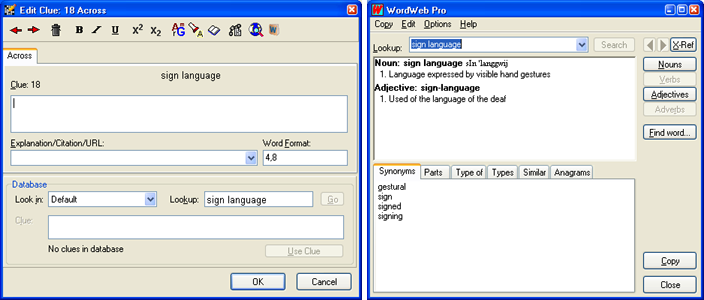
0607 cluepane-wordweb

Immediately evident in the second window (accessed via the top right icon of the toolbar) are the various tabs via which you can select e.g. examples of your answer and even anagrams. To the left of the WordWeb Pro icon is a facility which directs you to online dictionaries where your answer is listed. Two other icons are significant; the “chain” icon lets you link answers whose components are separated in the grid, e.g.:

0809 gridfill2 links

The “book” icon brings up a modest selection of indicators for 1- or 2-letter components. It also lists anagram and some other wordplay indicators which are useful, but it’s at this point TEA comes into its own as it is far superior when it comes to suggesting how answers can be split into wordplay components and how those components can be indicated.

OK, so let’s zoom ahead and see what we can do with a completed puzzle. Above the entry PARTNERS in the sample grid is a button which says “Web Publish”. This brilliant feature starts by offering a huge number of options for how you want your interactive online puzzle to look. The overall applet dimensions, grid cell size, clue panel width, colours, fonts, whether or not to include ‘Reveal’ buttons, timer, even an automatically generated PDF version – all of this and more is at your disposal. Once you’ve made your choices, click “Upload to web” and your puzzle presents itself online, at which point you can add a title, author name, instructions, even a picture if you want one. You can select to make your puzzle public (can be searched by anonymous users) or private (only accessible to those for whom you provide a link) and there you are – an online puzzle for the pleasure of your fans. It’s a doddle.

Well, I say ‘doddle’. It isn’t always a smooth process and if you’ve already got your browser in action before you press “Upload to web” you may get a “Cannot display the web page” message. Just to avoid that frustration, exit your browser first – I do that and never have any problem. Once your puzzle is online, also remember to copy and paste the URL somewhere. You can of course access an admin area to call up the puzzle but making a note of it beforehand is usually more practical.

You can also export your puzzle offline in various formats. For reference I always produce a complete puzzle in a Word doc, with grid, clues, numbered solution and clue explanations; all of these can be copied to the clipboard separately.

You can also export the puzzle as a PDF, or in any of the “display” formats such as AcrossLite, or as simple TXT, or (in the case of grids) a variety of image formats. This grab gives an idea of the options:

10 export

It’s pretty comprehensive! The only not-so-good feature is PDF – while everything works, personally I find the resulting layout a bit clumsy and it’s not very easy to adapt it (there aren’t many formatting options anyway). If you want to generate PDFs I recommend clipboarding everything into Word and using a free PDF generator such as NitroPDF, which produces the file via the print dialogue.

Despite the imperfect PDFs and the limited wordplay facilities it’s hard to give this package anything other than 10 out of 10. In daily use it’s deliciously simple to use and you’re very unlikely to think to yourself “There’s something missing here”. And as for the price… well, I mentioned PhotoShop. I’m also very much into music recording and as soon as you get into professional software as used by professionals the costs become astronomical. CC is professional, and €129 for all of these goodies is exceptional value.

Crosswordman

In terms of puzzle types TEA isn’t a patch on CC, but it isn’t supposed to be. Its creator Ross Beresford has a Listener crossword background and the highly sophisticated nature of this puzzle genre echoes all the way through TEA. The software consists of three main (separately purchasable) products – Sympathy Crossword Construction, TEA Crossword Helper and Wordplay Wizard – I can’t emphasise enough that buying all three is what you really need to get the full enjoyment. If you already have CC it could be argued you don’t really need TEA Crossword Helper, but since the entire package costs £129.95 it’s worth the £25 of that for TEA, if only for the convenience of not having to switch between applications!

INCIDENTALLY – for both CC and TEA, after ordering online you receive a download link for the software; you don’t need to sit around waiting for a CD-ROM to arrive (although that is an option).

When you launch TEA this is what you get:

11 TEA launch

There are fewer toys to play with than CC but, as you can see, everything revolves around puzzles for which you will be writing clues. Preset grids are available and, of course, you can design your own – and you also get the standard sets of Times and FT grids. Note that both of these are incomplete; the Times recently launched a handful of new grids and new ones have been appearing in the FT too; these will be incorporated in the new release of TEA.

Once you have selected a grid you can also choose which of the inbuilt word lists to use, and TEA’s implementation of this is, I think, better than CC in that all of the word lists appear together rather than under separate tabs:

12 searchpane1

There is also the ability to check the dictionary entry for an answer by highlighting it in the list and keying Ctrl + Enter, which is helpful in deciding if the definitions point towards a good clue in conjunction with whatever wordplay elements you uncover. The “Sport” word list is one I created, so TEA’s dictionary won’t feed off its entries. The same applies to entries which have an italicised dictionary citation – you’ll need to refer to the appropriate dictionary for a definition (but most of us have at least one dictionary, don’t we, if we’re ‘serious’ crossword setters?).

Like CC you can chicken out and let the software fill the grid, but TEA recognises that giving the setter no choice in this process may be a bad thing, so you can opt for an interactive fill. This is especially clever:

13 interactivefill

TEA examines the grid and calculates which light should be looked at first to (hopefully) ensure maximum fillability. It then “scores” each potential answer to show which will offer the greatest number of options as you continue the fill.

Filling the grid is fun enough, but TEA’s first major difference versus CC is the way you can search its wordlists. Built into its engine are various parameters which you can use to look for anagrams, part anagrams, specific letter patterns and much more. I like to produce the occasional pangrammatic crossword, and when I have just a couple of slots left it’s great to be able to insert a string such as:

14 searchpane2

TEA instantly offers SILVER FOX and SULFOXIDE as entries which match my requirement for a 9-letter word starting S-something-L and containing the letters F and X somewhere. And supposing I want to make a themed crossword where several anagrammed answers contain the name of a tree? Easy – I choose a tree, plant it in the search string and away we go:

15 searchpane3

There are a great many search templates to use, employing choice lists, variables and macros, and sometimes it’s a fascinating exercise just to play around with those. An example from the help file illustrates a search input as L[^AEIOU]... - in other words it will look for 5-letter answers starting with L but with a consonant as the second letter. Digits can be used to “lock” particular letters, so .11...11.. will produce a list of answers where the second, third, seventh and eighth letters are the same, as in FOOTSTOOLS, whereas .11...22.. will read as the same pattern but with a different double letter towards the end of the word, as in BOOKSELLER. Because most of the patterns can be used in combination you end up with an almost endless array of search possibilities.

The tricks are not confined to patterns for individual lights. Gimmicks can be added to puzzle fill, such as letters latent or misprints using this dialogue:

16 gimmicks

Once again, it’s worth mentioning that further gimmicks will be available when the new version of TEA is released.

As for the grid fill, I’d say there is only one area where I think CC has the upper hand, and that’s the process of linking lights to form single answers. It can be done in TEA, of course, but the CC version is far more straightforward. However, I believe that in the new release it will be possible to highlight separate lights in the grid, in any order, search for answers fitting the resulting pattern and automatically link them, so it could turn out that TEA will win that contest.

When an answer has been placed in the grid, there is no need to click an icon to begin writing its clue. A correctly placed double click on the answer itself will invoke the clue-writing pane:

17 cluetext

As the tabs indicate, TEA offers plenty of scope for ‘unusual’ extras for an answer or its corresponding light, but below the ‘Clue’ window is a button of particular importance. The Clue Workshop (sold separately as Wordplay Wizard) is an aspect of TEA that isn’t just good – it can, and probably will, help you to become a better cryptic clue writer. I’ve been setting cryptics for more than thirty years, but Clue Workshop has a habit of showing me ideas which I may have missed had I been working without it.

18 clueworkshop

Arranged in order of the number of wordplay components, the Workshop offers an often bewildering array of breakdowns which recognise deletions, charades, anagrams, reversals, containers, alternate letters and more. You’ll notice that each offering features items in red and blue text. A right click of blue items reveals a list of abbreviations pertinent to that letter or pair of letters. This list also indicates how commonly known those abbreviations are, so you can select one according to your target audience or according to what is sanctioned by your crossword editor. A right click of the red items leads to wordplay indicators for anagrams, charades, containers, reversals etc.

Although I haven’t gone into a huge amount of detail about this aspect of TEA, it is in my opinion an aspect of the software which is massively important for setters of all standards. Although, to be honest, I wouldn’t recommend it (because the rest of the package is so good) Clue Workshop is available as a separate module which you can use outside of TEA.

Puzzle export from TEA is perhaps not as extensive as CC but what it offers is generous enough to cover everything you are likely to need:

19 export

Since one of the export options is Across TEXT it is easy to create the full puzzle format ready for use in AcrossLite.

CC and TEA both display your work in progress, but do it differently. In CC you open a separate window to see the clues written so far, while TEA presents a full page with title, grid, preamble and clues on view. Neither is superior to the other, but it’s something to bear in mind if one option is preferable to the other.

Which one to buy?

To be absolutely honest, if your budget can stretch that far you really should go for both, as both packages are packed with useful features, a small number of which are unique but well worth having. However, buying both will set you back about £250 (on average I suppose that equates to about two published UK newspaper crosswords), so what if it really comes down to one or the other?

If you want to concentrate on sophisticated, inspired cryptic crosswords TEA looks to be the only option. The only (fairly small) downside to this is that newspapers tend to prefer submissions in CC – I set for the Times, FT and Independent and all of these request crosswords as CC files. I’d say the Independent is the most insistent because the online puzzle uses CC’s Java applet; the Times and FT do their own thing.

For me, I have to say I couldn’t manage with just one of the two. Overall, CC edges it in terms of simplicity and ease of use, while TEA has those features which make the clue-writing process hugely enjoyable and inspiring. I actually had an ancient demo version of TEA for several years, but later chose the full download of CC because at the time I was producing sudoku puzzles for my own website. Just over a year ago, after seeing that TEA had developed significantly compared to my old demo, I downloaded that too.

Before I toddle off for a coffee and resumption of my latest brain-killer, I should mention that CC and TEA aren’t the only packages out there. Crossword Maestro and Crossword Weaver are two others which spring to mind, but I’ve never used them so can pass no comment – perhaps others would like to chip in?

Links:

Crossword Compiler: http://www.crossword-compiler.com/
Crosswordman: http://www.crosswordman.com/

Related Posts:

If you wish to keep track of further articles on Crossword Unclued, you can subscribe to it in a reader via RSS Feed. You can also subscribe by email and have articles delivered to your inbox, or follow me on twitter to get notified of new links.

Wednesday, 10 November 2010

Embed Interactive Crosswords Within Your Blog / Website

Across Lite Embed You're probably familiar with Across Lite, the popular crossword interface. Literate Software (LitSoft), the creators of Across Lite, have now launched a free crossword sharing/embedding service. This service allows you to embed crosswords in interactive format within web sites and blogs, and share them easily with others on twitter, facebook, emails, etc.

This is a great utility for amateur/freelance crossword setters as it lets them offer interactive crosswords from within their sites instead of having to host them elsewhere. It's pretty simple and quick to set up as well.

How To Use The Service

Upload your crossword in "Across format" at this location. [Instructions for how to create Across format crosswords]

Once uploaded, the service emails you the link to a private page. This gives you:

  • A direct link to the crossword, which you can share on social media to send people to a custom page for your crossword
  • Code for embedding the crossword, which you can copy-paste into your blog/website. You have two sizes to choose from: Standard width (595w x 440h) and Narrow (520w x 472h).

Note: You must have the rights to publish the crossword you upload!

A Live Demo

Below is a narrow-width sample crossword, a US-style cryptic. [RSS readers: please visit the blog to view the interactive grid.]

Each solver gets their own copy of the crossword to solve. Work in progress can be saved via browser cookies.


Sorry, but it looks like Java is either not available or enabled in this browser.

On a Mac or PC, you can download the crossword to solve with Across Lite installed on your computer.

If you do not have Across Lite installed, you can download a free copy from here


Try it out for yourself. You can read more about the service and give your feedback to its creators Litsoft here. You might also like to follow the newly launched Litsoft blog for their thoughts on the commercial aspects of the crossword industry.

Related Posts:

If you wish to keep track of further articles on Crossword Unclued, you can subscribe to it in a reader via RSS Feed. You can also subscribe by email and have articles delivered to your inbox, or follow me on twitter to get notified of new links.

Wednesday, 14 October 2009

Across Lite For Interactive Crosswords

Across Lite Many crosswords sites provide interactive puzzles in "Across format". This is to explain what the "Across format" is, and how to use it for solving crosswords interactively.

A puzzle in Across format is one that can be viewed and solved interactively with the software Across Lite. You can recognize an Across Lite puzzle by the .PUZ file extension.

What does Across Lite do?

For crossword solvers, Across Lite enables interactive solving. It works for .PUZ crosswords stored on the hard disk as well as crosswords opened directly from the web browser.

How can I use Across Lite?

Once you have installed Across Lite on your computer, any file in Across format will open with a mouse click. To open and solve the crossword, click to launch it with an interactive screen.

Show Me An Example

An example of a puzzle opened with Across Lite:

Economic Times Puzzle in Across Lite format

One of its interesting features is the Pen/Pencil tool. You can write in your answers with a Pen if you're confident, and a lighter-coloured Pencil if in doubt.

Other features include the facility to resize the grid, change the position of clue prompt, print the puzzle, etc. There are also Check/Reveal options, which get enabled if the crossword publisher has provided solutions with the puzzle.

Where can I get Across Lite?

Across Lite is owned by Literate Software Systems, and can be downloaded from here: Download Across Lite.

The installation is simple and quick, and is free for non-commercial use.

Related Posts/Links:

If you wish to keep track of further articles on Crossword Unclued, you can subscribe to it in a reader via RSS Feed. You can also subscribe by email and have articles delivered to your inbox.

Wednesday, 8 July 2009

Crossword Solving Aids

crossword-solver Sometimes, we take up the grid and pen, start solving and fill in the whole puzzle.

Sometimes, we don't. We get stuck on a word we don't know. We have a corner remaining and not enough crossings to take us along further.

What do you do when that happens?

Set aside the puzzle and move on?
Keep wondering what those missing answers are, wait for the solution to be published? Visit the solving communities to check?
Use aids to help you reach the end?

If you're the last kind, you are spoilt for choice. All kinds of crossword aids are at your disposal - the old-fashioned print dictionaries, knowledge resources on the internet, anagram solver, electronic encyclopedias, even Artificial Intelligence-equipped crossword solver software that claim they can complete a cryptic crossword without human intervention.

Is using aids cheating?

If aids are used in informal solving, I see no 'ethical' problems with it. Crossword solving is for fun. If a solver's choice is to use an automated clue solver to give answers, so be it. That choice doesn't make sense to me – it is equivalent to sending someone else to watch a great movie on your behalf - but it is surely not a deceitful activity to merit such a strong name!

I wish the Guardian crossword site would rename their "Cheat" button to a milder "Show" or "Reveal" :)

Which aids do you use?

Based on what I've grown accustomed to or what I've come to like, I use these:

Chambers Dictionary: This huge red hard-bound book is by my side whenever I attempt the tougher crosswords at home. Some crosswords like the Azed make special mention of the edition number: 2008 (11th edition) currently. Sadly this edition is not available in India, but for most purposes my 2000 edition works fine. If you can get hold of the latest edition, though, do that. (And if you can find it in India, please leave a comment to tell me where.)

An online Chambers dictionary/thesaurus exists but that is a 'lite' version of the real thing.

Dictionary.com: I use this for quick confirmation when I am solving online. A word of caution - this dictionary doesn't list obscure words or rare meanings of words, and what's more worrying, it might be listing words that are not legit according to standard dictionaries (I say this based on the incorrectly spelt FUSCHIA (sic)). I use it more out of habit than anything else, it's good for easy lookups but might not be dependable for difficult words.

Wikipedia: European wars, English counties, Western classical music – for information in such areas that I know little about, I go to Wikipedia. A fair clue's wordplay and checking give enough pointers to lead to the solution, from there it's just a matter of verifying it. e.g. A clue like "Seaman, beginning to search through charts, misconstrued Scottish area (9) – FT 13107 (Aardvark)" can be solved and confidently answered – backed by a look at Wikipedia - even if one hasn't heard of the Scottish area before. Not all clues are so generous though and one might have to trawl through Wikipedia some more, but one picks up a lot of trivia in the process which may come in handy in future puzzles.

With Wikipedia, one has to be careful about quality and accuracy. The comments on the header/footer of the article, plus the History/Discussion tabs, give a good idea of how recently edited or disputed the article is. Since the knowledge areas in crosswords that I search for are generally stable and non-controversial, and most knowledge is at the surface level (e.g. a fictional character's name, not an in-depth understanding of her role in the book) – Wikipedia has been pretty reliable for me.

Google: Unfamiliar idioms and phrases, colloquialism or slang – I simply put them into Google. Enclosing a long phrase within double-quotes and writing "meaning" next to it gives better search results.

Last but not least, as they say - I check with a Tamil friend when faced with clues of this kind from The Hindu Crossword: "Congratulation to workers for silk from south India (5)– THC 9471 (Gridman)" :P

That's about it. Also, I resort to aids only after I have finished as much as of the crossword as I possibly could on my own. If I'm blogging about a puzzle, I think it's important to mention the solutions obtained with external help.

I don't go for stronger aids like pattern match or anagram solver but if people want to, I think that's fine. To me the greater evil of such forms of crossword help is not the 'cheating' factor but that they hinder improvement in solving skills. The only way to attain the level where one glances at the anagram fodder and gets the answer, is the Do-It-Yourself way. The shortcut of anagram solver will not get one there.

Which aids do you use? And what do you think about using aids?

Related Links:

If you wish to keep track of further articles on Crossword Unclued, you can subscribe to it in a reader via RSS Feed. You can also subscribe by email and have articles delivered to your inbox.

Sunday, 19 April 2009

Get Notified Of Online Crossword Updates

If you solve a daily crossword online, do you keep checking the paper's website to find out if they've uploaded the latest, and if they haven't, refreshing the page every few minutes hoping they'd change it quickly?

If you're really keen to know as soon as the latest crossword is up, you might be wasting a lot of time in repeat visits to the crossword page. I found myself doing that for Financial Times crossword on Fridays. That's the day I blog on fifteensquared.net for FT and want to get the grid as soon as it is available. The time of upload varies, so one can't tell precisely when the day's crossword will be up.

I'm using a tool now that checks the crossword page in the background. It would also be useful for solvers of other crosswords online – such as The Hindu Crossword solvers from the US/UK time zones, who get the latest crossword in the afternoon while it is midnight in India.

So What Is This Tool?

The tool is called Update Scanner. It monitors web pages for updates. The tool is a Firefox add-on. IE users – it is time you switched to the better browser :)

You can get Update Scanner from here: Install Update Scanner. This link will open a screen as below:

update-scanner-download

Click on the Add to Firefox button, and Install Now on the popup following it. This will add Update Scanner to Tools menu of Firefox.

Installed! How To Make It Track Crosswords?

A few simple steps:

  1. Open the crossword page.
    For Financial Times: http://www.ft.com/arts/crossword
    For The Hindu Crossword: http://www.hindu.com/ (Track the front page itself, as The Hindu does not have a common "crossword" page. Still, it is sufficient to know that the "Miscellaneous" link on the front page has changed.)
  2. Right-click anywhere on the page, and choose the menu option Scan Page For Updates…

     update-scanner-scan-page-ft

  3. A dialog window will open as below. Drag the sliders to adjust how frequently you want to scan the page (can vary from every 5 minutes to every week), and the extent of change you want to track (set it to "Cosmetic Changes are ignored" for the FT page, and a broader level for THC, say "Medium Changes are ignored").

     update-scanner-preferences

  4. update-scanner-notificationThat's your job done, Update Scanner will handle the rest. As soon the new crossword is uploaded, it will show this little window in the bottom status bar. Click the blue Up arrow on it to visit the changed site and get the latest crossword. If you are tracking many sites, the ones that have changed will be in bold on the Update Scanner sidebar.

    update-scanner-display-changes

Notes

  1. Switch on the tool only when you need it. e.g. If you know that the Hindu Crossword will be up after 12pm your time, switch it on at 12pm. After the new crossword notification reaches you, disable it till next use. (A general good practice is to keep unnecessary processes on your computer off.) To disable, go to Firefox menu Tools –> Add-ons, select Update Scanner and click Disable.

     update-scanner-disable 

  2. You need not apply Update Scanner on pages that provide RSS feed of their content. Subscribe to such pages through your reader or email. The Hindu Crossword, for example, is part of the RSS feed: http://www.hindu.com/rss/10hdline.xml - you could use that instead to get notified of crossword updates.

Related Posts / Links:

If you wish to keep track of further articles on Crossword Unclued, you can subscribe to it in a reader via RSS Feed. You can also subscribe by email and have articles delivered to your inbox.